

Overview

The PT Reports are a collection of reports aimed at giving a better insight into trainer effectiveness in some way, either directly or indirectly. For example, you can quickly see how many session pack sales have been made, the number of inductions that have been performed, and trainer impact on (and engagement with) existing members, to name just a few of the different ways you can look at the data.
Note: The Report Builder tool lists different reports according to the type of staff member using it; don't worry if your own screens don't look exactly like the ones here!
Here's a description of the PT Reports shown in the screenshot above:
Member Packs
This report gives details of all session packs that were sold/created in the previous month*. This includes details of the session pack names, number of sessions total and remaining, the member of staff selling the pack and more - see the table below for a complete list.

*in common with many other reports in the reporting tool, the default time period used when generating a report covers the last complete calendar month. When running a report in the middle of March, for example, the default date range will span a complete month from the start of the preceding month, in this case February:
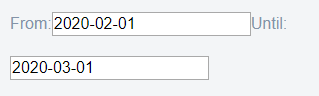
Clicking either of the date fields will open a date picker, allowing you to choose a new date range - make any changes you like and then click outside of the date picker (or choose a time) to use the date and time shown and dismiss the picker:

For your reference, this report includes the following columns:
| Column Heading | Notes |
|---|---|
| Gym Name | - |
| First Name | - |
| Last Name | - |
| Key Fob | - |
| Pack Name | - |
| Pack Status | Active, Pending etc. |
| Total Sessions | The number of session credits contained in the pack |
| Remaining Sessions | The number of unused session credits |
| Description | - |
| Cost | - |
| Created At | The date & time of purchase |
| Activated At | The date & time when the first session credit was used |
| Expires At | The (optional) date after which this pack's credits can no longer be used. |
| Seller First Name | - |
| Seller Last Name | - |
Training KPIs

The Training KPIs report provides a range of PT Key Performance Indicators and aims to show the number of clients converted at induction amongst other metrics. Once again, check the table below for details of all the various columns that are included.
| Column Heading | Notes |
| Gym Name | - |
| Month | - |
| Inductions Booked at Sign Up | The number of clients that had a fitness consultation scheduled on the day they joined |
| Inductions Booked at Sign Up % | as a percentage of total new joiners for the period |
| Total Inductions Booked | from all sources; both new and existing clients |
| Total Inductions Show | The number of members who showed up for a (FC) booking |
| Inductions Show % | The previous total expressed as a percentage of all inductions booked |
| Remote Close |
The number of inductions within the report timeframe that resulted in the sale of a remote training add-on or pack |
| Group Close | The number of inductions within the report timeframe that resulted in the sale of a group training add-on or pack |
| PT Close | The number of inductions within the report timeframe that resulted in the sale of a 1v1 add-on or pack |
| Total PT/Group/Remote Close Session Packs | The combined total of all new session packs sold via PT/Group/Remote sessions |
| Total PT/Group/Remote Close Add-Ons | The combined total of all new add ons or packs sold |
| Total PT/Group/Remote Close % | The previous total expressed as a percentage of all attended sessions for the period |
Remote Training Drivers

Shows how well coaches are being assigned and distributed amongst your members. The columns in this report comprise the following:
| Column Name | Notes |
| Gym Name | - |
| Month | - |
| Coaches Assigned Total | - |
| Coaches Assigned to New Members | - |
| Coaches Assigned to New Members % | - |
| Coaches Assigned to All Members (from date) | - |
| Coaches Assigned to All Members (until date) | - |
| Coaches Assigned Total Percentage | - |
Training Conversion

This report shows the total number of members converted into pt, group and remote Packs or trial packs within the report timeframe.
| Column Name | Notes |
| Gym Name | - |
| Month | - |
| Group Clients Total # | Total members who have purchased any non-trial group training pack or add-on |
| Group Trial Clients Total # | As above but for group trial clients |
| Group Clients Converted Total # | |
| Group Clients Converted % | The percentage of group clients converted (from an induction) |
| Remote Clients Total # | |
| Remote Trial Clients Total # | |
| Remote Clients Converted % | from trial or FC |
| Converted Trial Total # | Total number of trial clients converted (group & remote) |
| Group Training Clients % | compared to all active members |
| Remote Training Clients % | compared to all active members |
| PT Clients Total # | |
| PT Clients % | compared to all active members |
| Total Coaching Penetration % | compared to all active members |
Training Sold By Coach

This report gives a detailed breakdown of the sales performance for each coach in the reporting period (for all clubs where appropriate)
| Column Name | Notes |
| Gym Name | - |
| Name of Coach | - |
| Total Training Clients (group, remote, 1v1) | - |
| Total Training Add-Ons (group, remote, 1v1) | - |
| Total Training Session Packs (group, remote, 1v1) | - |
| Total Remote Add-Ons (Trial/Challenge/Experience) | - |
| Total Remote Add-Ons (Non-Trial) | - |
| Total Remote Packs (Trial/Challenge/Experience) | - |
| Total Remote Packs (sessions per pack or type of pack)(non-trial) | - |
| Total Group Packs (Trial/Challenge/Experience) | - |
| Total Group Packs (Non-Trial) | - |
Training Revenue

The Training Revenue report breaks down remote, group and PT(1v1) revenue to show what was sold or collected during the period.
| Column Name | Notes |
| Gym Name | - |
| Group Training Revenue Sold | - |
| Remote Training Revenue Sold | - |
| Personal Training Revenue Sold | personal = 1v1 training |
| Total Training Revenue Sold | - |
| Group Training Revenue Collected | - |
| Remote Training Revenue Collected | - |
| Personal Training Revenue Collected | - |
| Total Training Revenue Collected | - |
Comments
0 comments
Please sign in to leave a comment.